GiroCode Generator
Create a GiroCode for a German invoice, with the account number checked against the Bundesbank rules and a payment block to place beside it. The tool opens on a sample payment; replace it with your own.
Valid IBAN, Germany, Commerzbank AG Cologne
Account number check digit holds for this bank's Bundesbank method.
Sample
Sample payment. The IBAN, the name, the amount and the reference are placeholders that show how the tool works. Replace them with your own; the downloads stay locked until the IBAN, the name and the reference are yours.
Have a Bankleitzahl and Kontonummer instead?
Some banks publish their own conversion rule with the Bundesbank (IBAN-Regeln), so an IBAN built from these two numbers can differ from the one your bank issued. Compare it with your bank statement before it goes on an invoice.
Scan with a SEPA banking app to pre-fill this transfer.
DE89 3704 0044 0532 0130 00
Commerzbank AG Cologne · COBADEFF
Generated in your browser. Your IBAN is never uploaded.SecurityMethodology
This is still sample data. Replace the IBAN and the name with your own.
- Beneficiary
- Example Studio GmbH
- IBAN
- DE89 3704 0044 0532 0130 00
- BIC
- COBADEFF
- Amount
- EUR 49.90
- Reference
- Rechnung RE-2026-014
Payment details
The Empfänger is required for a GiroCode. Betrag and Verwendungszweck are optional.
Taken from the IBAN: COBADEFF. Type one to override it.
Invoice number, customer number and invoice date, joined into one line you can still edit above.
Payment block for your invoice
The GiroCode with the same details as text, for a payer who does not scan. The file you download is exactly what you see.
Appearance and output
Colour and file size.
Contrast 99 percent, grade A on the ISO/IEC 15415 scale barcode verifiers use.
A solid background travels with the file, so the code keeps its quiet zone wherever you place it.Transparent applies to the SVG and PNG. PDF pages are always white. The quiet zone goes transparent too, so keep what sits behind the code light.
87 mm at 300 dpi
1024 px is 87 mm wide at 300 dpi, quiet zone included. SVG and PDF are vector and print at any size. This setting only changes the PNG.
Fixed by the standard, and why there are only three settings
Error correction M and the four module quiet zone are fixed by EPC069-12, and the quiet zone is already inside every file we produce.
The 0.4 mm module floor is from the Swiss QR-bill implementation guidelines (SIX). GS1 sets a comparable 0.396 mm minimum for retail scanning.
We ship colour and size. We do not ship a centre logo, module shapes, eye shapes or gradient fills, because a payment QR that fails to scan is a failed payment.
Appearance settings are remembered on this device. Payment data is never saved.
EPC payload96 of 331 bytes
| Line | Field | Value | Source | Bytes |
|---|---|---|---|---|
| 1 | Service tag | BCD | fixed | 3 |
| 2 | Version | 002 | fixed | 3 |
| 3 | Character set | 1 | fixed | 1 |
| 4 | Identification | SCT | fixed | 3 |
| 5 | BIC | COBADEFF | detected | 8 |
| 6 | Beneficiary name | Example Studio GmbH | you | 19 |
| 7 | IBAN | DE89370400440532013000 | you | 22 |
| 8 | Amount | EUR49.9 | you | 7 |
| 9 | Purpose | empty | not used | 0 |
| 10 | Structured reference | empty | not used | 0 |
| 11 | Unstructured reference | Rechnung RE-2026-014 | you | 20 |
| 12 | Beneficiary to originator | empty | not emitted | 0 |
| Line separators | 10 | |||
| Total | 96 | |||
331 bytes is the byte capacity of a QR version 13 symbol at error correction M, which is exactly what EPC069-12 fixes. That identity holds only at M.
What Is a GiroCode?
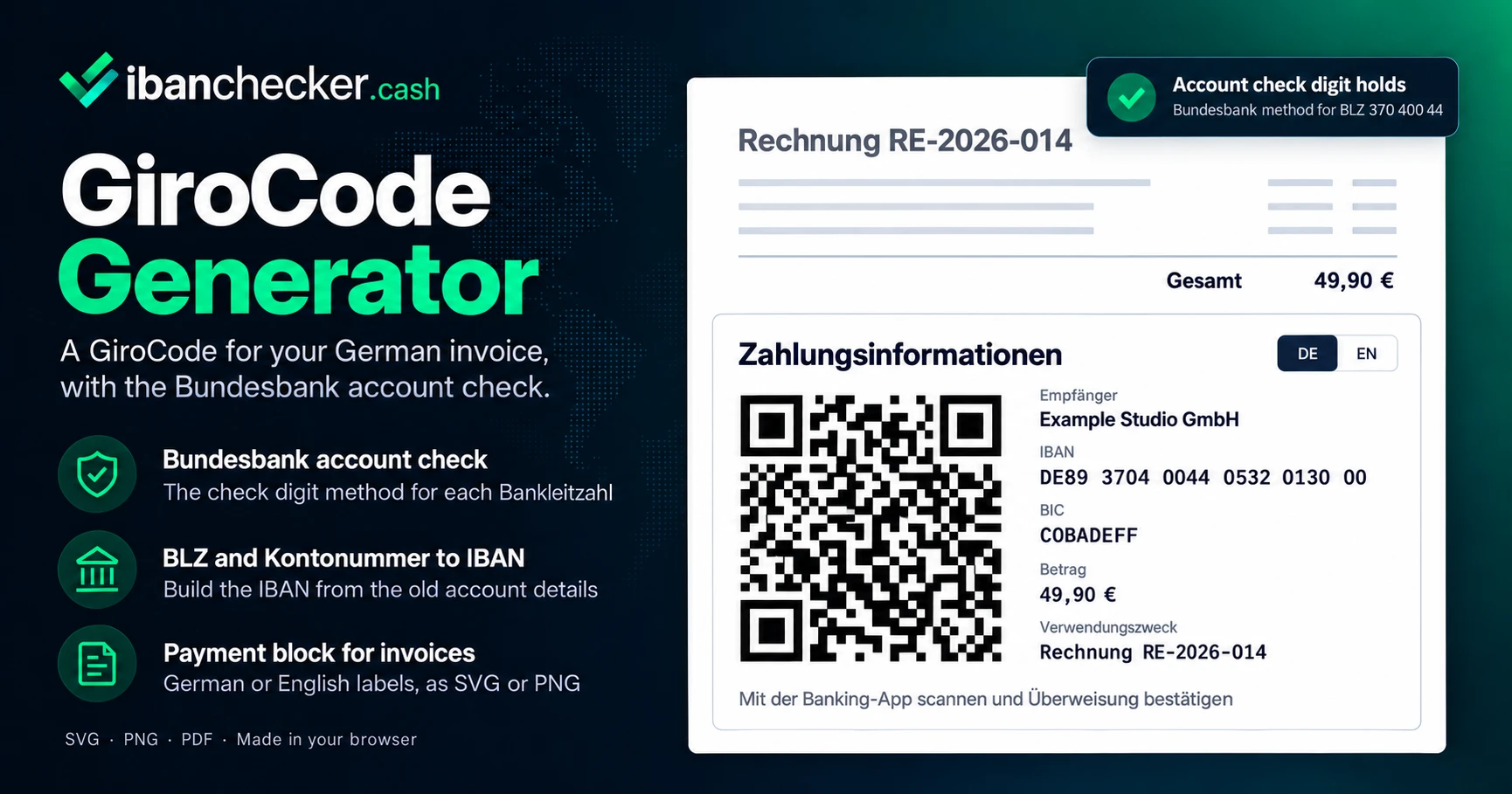
A GiroCode is the QR code printed on German invoices, fee notices and payment slips that holds everything needed for an Überweisung. The payer opens their banking app, scans the code and confirms a transfer that is already filled in, instead of typing a 22-character IBAN and an invoice number by hand.
Behind the German name is the EPC QR code described by the European Payments Council in its guideline EPC069-12. A GiroCode is a SEPA credit transfer, so the amount is in euro. In German the same thing is often called a "QR-Code für Überweisung".
What Goes Into a GiroCode?
German banking apps and invoicing software label the fields in German. The form above uses the same words:
- Empfänger (beneficiary): the person or company being paid, up to 70 characters. Required.
- IBAN: the account the money goes to. A German IBAN is 22 characters: DE, two check digits, the eight-digit Bankleitzahl and a ten-digit account number.
- BIC: optional within the EEA, filled in from the Bankleitzahl when we know the bank.
- Betrag (amount): in euro, optional. Both 1.234,56 and 1,234.56 are read correctly; an amount such as 1.500, which means different things in German and English, is refused rather than guessed.
- Verwendungszweck (reference): up to 140 characters of free text, typically the invoice and customer numbers.
Why Does This Generator Check the Account Number?
A GiroCode prints your account number on every invoice you send. A mistake in it is copied onto all of them, and a code with a wrong IBAN still scans perfectly. The IBAN check digits catch most typing errors, but not all of them.
The Deutsche Bundesbank assigns every Bankleitzahl a check digit method for the account number itself, the Prüfziffer. This page runs that method on the account inside your IBAN and says whether it holds. A failure does not stop the code, because the check is there to inform you, not to overrule you, but it is the moment to compare the number with your bank statement. If you only have the Bankleitzahl and Kontonummer, the tool builds the IBAN from them; some banks publish their own conversion rule, so compare the result with your statement too. The same account check is part of the IBAN checker.
How Do You Put a GiroCode on an Invoice?
- Put the Rechnungsnummer in the Verwendungszweck so the payment arrives with the reference you need to match it. The builder in the tool joins invoice number, customer number and date into one line, in German or English.
- Print the details as text beside the code. Not every payer scans. The payment block under the fields puts the Empfänger, IBAN, BIC, Betrag and Verwendungszweck next to the code in one SVG or PNG, read from the code itself so the two always agree.
- Keep it large enough. The generator shows the smallest print width that keeps each square of the code at 0.4 mm or more.
- Use a dark code on a light background. SVG and PDF stay sharp at any size in an invoice template.
Leave the Betrag empty for a code you print once and reuse, such as on a letterhead or a donation page. Fill it in for a code that belongs to a single invoice.
Why Does a GiroCode Not Scan?
- It is printed too small. Each square should stay at least 0.4 mm wide; the tool shows the minimum width for your code.
- The contrast is too low. A dark code on a white background reads best. The tool warns before download when the colours are too close.
- The quiet zone was cropped. The blank border around the code is part of it. Every file from this tool already includes it; do not trim it in your invoice template.
- The content breaks the standard. Codes made elsewhere sometimes fill two reference fields at once or carry spaces inside the IBAN. Read such a code with the payment QR decoder, which names the problem.
- The app does not support it. Support is each bank's decision. Try the scan option inside the transfer screen of the banking app rather than the phone camera.
Which Banking Apps Read a GiroCode?
Support is decided by each bank for its own app, so check the app your customers use. S-Public Services, a company of the Sparkassen-Finanzgruppe, names the Sparkasse app as a banking app with a QR code reader for paying a GiroCode. VR Bank Rhein-Neckar, a member of the Volksbanken Raiffeisenbanken, describes QR code recognition in the VR-BankingApp under the function Scan2Bank.
Nothing in a GiroCode proves that the Empfänger owns the IBAN. If you are paying a code rather than making one, read it first with the payment QR decoder, which shows every field and checks the account before you pay.
Is a GiroCode the Same as an EPC QR Code?
GiroCode is the name used in Germany for codes that follow EPC069-12, and we know of no separate published GiroCode specification, so this tool writes the EPC069-12 payload. For accounts in other countries, an RF creditor reference, and the technical detail of the standard, use the EPC QR code generator, which checks each code against the guideline rule by rule. For a QR code that holds only an IBAN, use the IBAN QR code generator.
Frequently Asked Questions
What is a GiroCode?
A GiroCode is a QR code on an invoice or payment slip that holds a complete SEPA credit transfer: the Empfänger, the IBAN, optionally the BIC, the amount and the Verwendungszweck. A banking app that supports it fills in the Überweisung from the code, and the payer confirms. It follows the European Payments Council guideline EPC069-12.
How do I create a GiroCode?
Enter your IBAN, the name of the account holder, the amount and the Verwendungszweck. The code updates as you type and can be downloaded as SVG, PNG or PDF for your invoice, or as a payment block with the details beside it.
What does the Bundesbank account check add?
Every German Bankleitzahl is assigned a check digit method by the Bundesbank. We run that method on the account number inside the IBAN. A valid IBAN can still fail it, which usually means a typing error in the account number. The generator warns but never blocks the code.
Can a GiroCode be used without an amount?
Yes. The amount is optional. Leave it empty for a code you print once and reuse, such as on a letterhead or a donation page, so the payer enters the amount.
How large should a GiroCode be printed?
Large enough that each square of the code stays at least 0.4 mm wide. The size depends on how much the code holds, so the generator works out the smallest width for your own code and shows it under PNG size in the appearance settings.
Is my data stored when I create a GiroCode?
No. The GiroCode is generated in your browser. The IBAN, name, amount and Verwendungszweck are not sent to our servers.
Sources & References
- European Payments Council: EPC069-12 v3.1, guidelines for a SEPA credit transfer QR code
- Deutsche Bundesbank: Check digit methods for German account numbers
- Deutsche Bundesbank: IBAN rules published by German banks
- S-Public Services (Sparkassen-Finanzgruppe): Paying with GiroCode
- VR Bank Rhein-Neckar: What is a GiroCode, and Scan2Bank in the VR-BankingApp
Last updated: September 2026